Windows 11 Version 26H2: New Features, Update Guide, Support & Everything You Need to Know
Windows 11 version 26H2 is Microsoft's Windows 11 2026 Update. It introduces the latest Windows innovations while using a streamlined enablement-package approach for eligible PCs already running Windows 11 24H2 or 25H2.
Windows 11 26H2: What Is It?
Windows 11 version 26H2, officially called the Windows 11 2026 Update, is Microsoft's latest annual Windows feature update.
Microsoft says 26H2 is built on the same servicing foundation as recent Windows 11 releases. For eligible PCs already running Windows 11 version 24H2 or 25H2, the upgrade can be delivered through a relatively small enablement package.
That means the upgrade can behave more like a regular Windows update than a traditional large feature-upgrade process.
For official Windows 11 26H2 imagery, screenshots and Microsoft product visuals, use Microsoft's official Windows Experience Blog and Windows 11 download page.
Microsoft Windows 11 2026 Update — Official Images & Announcement
Microsoft Windows 11 Official Download Page
What's New in Windows 11 26H2?
Windows 11 26H2 is not simply a collection of features developed exclusively on one launch day. Microsoft says many of the improvements were gradually introduced through monthly servicing updates for Windows 11 24H2 and 25H2.
For commercial customers, Windows Settings Backup can help preserve supported Windows settings and Microsoft Store app lists for recovery and device replacement scenarios.
App-specific taskbar actions provide access to common actions directly through Windows taskbar experiences.
Microsoft highlights improvements focused on File Explorer navigation and usability.
Microsoft says 26H2 includes the latest quality, reliability and security improvements.
File Explorer Improvements
File Explorer continues to receive usability improvements through Windows servicing updates. Microsoft has highlighted navigation and usability improvements as part of the 26H2 experience.
Recent September servicing changes also include improvements to the File Explorer preview experience and the way Home sections preserve their expanded or collapsed state.
How to Update to Windows 11 26H2
Microsoft says Windows 11 version 26H2 is available through a controlled rollout for eligible devices running Windows 11 24H2 and 25H2.
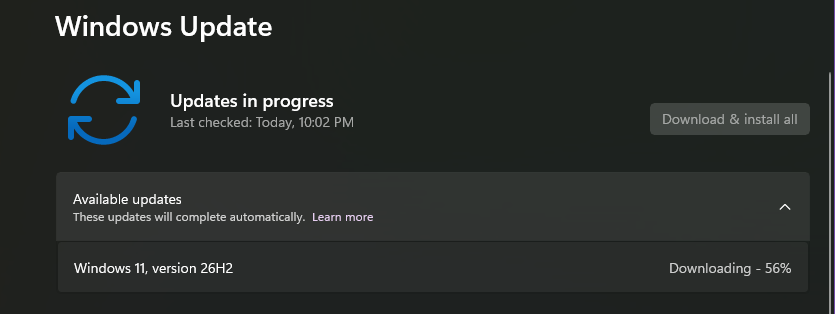
Open Settings → Windows Update.
Turn on Get the latest updates as soon as they're available if you want to be among the first to receive eligible updates.
If your device is eligible and the update has reached your device during the rollout, Windows Update will provide the option to download and install version 26H2.
For eligible devices receiving the enablement package, Microsoft says the transition requires a quick restart.
What Is the Windows 11 26H2 Enablement Package?
The enablement package is one of the most important technical differences in the Windows 11 26H2 upgrade experience.
Windows 11 versions 24H2, 25H2 and 26H2 share a common servicing branch and underlying codebase. Microsoft says many components required for 26H2 are therefore already present on eligible devices.
The enablement package acts as a switch that activates the new version's features rather than requiring a traditional full operating-system replacement.
Microsoft describes the enablement package as a lightweight update for eligible devices.
Microsoft says eligible devices can transition to 26H2 with a quick restart.
Windows 11 26H2 Requirements
Windows 11 26H2 is being offered to eligible devices that meet Microsoft's Windows 11 requirements and are supported for the update.
For an existing Windows 11 PC, the simplest way to determine whether 26H2 is currently offered is to check:
Microsoft controls the rollout based on device eligibility and compatibility.
Microsoft can use safeguard holds to temporarily prevent an update from being offered to devices where a known compatibility issue could affect the experience.
Therefore, if 26H2 does not appear immediately, that does not necessarily mean the PC cannot eventually receive it.
Windows 11 26H2 Support Lifecycle
Windows 11 Home and Pro
Windows 11 Enterprise and Education
Microsoft says installing version 26H2 resets the support lifecycle for supported Windows editions.
| Edition | Support Duration |
|---|---|
| Windows 11 Home | 24 months |
| Windows 11 Pro | 24 months |
| Windows 11 Enterprise | 36 months |
| Windows 11 Education | 36 months |
Windows 11 26H2 for Businesses and Organisations
Microsoft is also making Windows 11 26H2 available through the management tools used by organisations, including Windows Autopatch and the Microsoft 365 admin center.
Existing management tools, update rings, policies and deployment practices can continue to be used.
Microsoft recommends that commercial and education organisations begin with targeted deployments so they can validate applications, devices and business-critical workflows before expanding deployment.
If you manage an organisation's Windows devices, do not treat 26H2 as a simple consumer update. Validate critical applications, drivers, security policies and business workflows before broad deployment.
Security and Reliability Improvements
Microsoft describes Windows 11 26H2 as including the latest quality, reliability and security improvements.
Microsoft is also continuing its broader Windows servicing work, including security improvements delivered through monthly updates.
Secure Boot Certificate Changes
Microsoft has separately warned that Secure Boot certificates used by many Windows devices began reaching expiration timelines from June 2026. Microsoft is distributing updated certificates through Windows updates on eligible devices.
This is particularly relevant for IT administrators managing fleets of Windows PCs.
What About Windows 11 24H2?
Microsoft states that Windows 11 version 24H2 Home and Pro editions reach end of updates on October 13, 2026.
Therefore, organisations and users still running 24H2 should pay attention to their servicing lifecycle and available upgrade paths.
Where to Download Windows 11 26H2
Microsoft has updated its official Windows 11 download page to identify Windows 11 2026 Update | Version 26H2 as the current release.
⬇️ Official Microsoft Download
Use Microsoft's official download page for Installation Assistant, installation media and other supported Windows 11 installation options.
For Windows installation media, use Microsoft's official download channels rather than third-party ISO repositories. This reduces the risk of modified or tampered installation files.
Official Microsoft Resources
Official Microsoft download and installation options.
Microsoft Download →Microsoft's official announcement for the Windows 11 2026 Update.
Read Microsoft Announcement →Microsoft's continuously updated support page for 26H2.
View Update History →Check rollout status, known issues and safeguard holds.
Microsoft Release Health →MobileIndya Take
Windows 11 26H2 is an interesting update because Microsoft is focusing not only on new features but also on making the upgrade process less disruptive.
For eligible PCs already running Windows 11 24H2 or 25H2, the enablement-package approach can make the transition much quicker than a traditional major Windows upgrade.
The most important point for everyday users is that 26H2 is being rolled out gradually. If the update is not available on your PC immediately, Microsoft may simply not have made it available to that device yet, or a compatibility safeguard may be active.
For organisations, testing remains important before deploying the update broadly across business-critical systems.
Windows 11 26H2 FAQ
What is Windows 11 version 26H2?
Windows 11 version 26H2 is Microsoft's Windows 11 2026 Update, the annual second-half feature update for Windows 11.
When was Windows 11 26H2 released?
Microsoft announced the availability of Windows 11 2026 Update, version 26H2, on September 29, 2026. The update is being delivered through a controlled rollout.
Is Windows 11 26H2 free?
For eligible licensed Windows 11 devices, Microsoft provides version 26H2 through Windows Update. Availability depends on device eligibility and Microsoft's rollout.
How do I get Windows 11 26H2?
Go to Settings → Windows Update and turn on "Get the latest updates as soon as they're available." If your device is eligible and the update is available to it, Windows Update will offer version 26H2.
Is Windows 11 26H2 a major reinstall?
For eligible PCs running Windows 11 24H2 or 25H2, Microsoft delivers 26H2 through an enablement package. Microsoft says this can involve a small download and a single restart.
What are the major new features in Windows 11 26H2?
Microsoft highlights improvements across security, management, accessibility and productivity. For commercial customers, Windows Settings Backup, app-specific taskbar actions and File Explorer improvements are among the highlighted experiences.
How long is Windows 11 26H2 supported?
Microsoft lists 24 months of support for Home and Pro editions and 36 months for Enterprise and Education editions.
Should I manually install Windows 11 26H2?
For most users, checking Windows Update and waiting for the controlled rollout is the simplest approach. Users who need installation media can use Microsoft's official Windows 11 download page.
Why is Windows 11 26H2 not showing on my PC?
Microsoft is using a controlled rollout and can place safeguard holds on devices where compatibility issues are detected. Availability therefore varies by device.
Microsoft Windows Experience Blog — How to get the Windows 11 2026 Update
Microsoft Support — Windows 11 version 26H2 update history
Microsoft Windows Download — Download Windows 11